Elementor just leveled up (again) — Atomic Tabs + Entrance Interactions are here
I’m genuinely excited about this update because it pushes Elementor closer to Editor V4 / Elementor 4 in a way that actually changes how I build real websites: more modular, more predictable, and way more “design-system friendly.” Elementor 3.34 brings Atomic Tabs, the first stage of Interactions (starting with Entrance Interactions), and some foundational improvements that make the atomic workflow feel cleaner and more consistent.
Atomic Tabs: finally… tabs that don’t feel like a locked widget
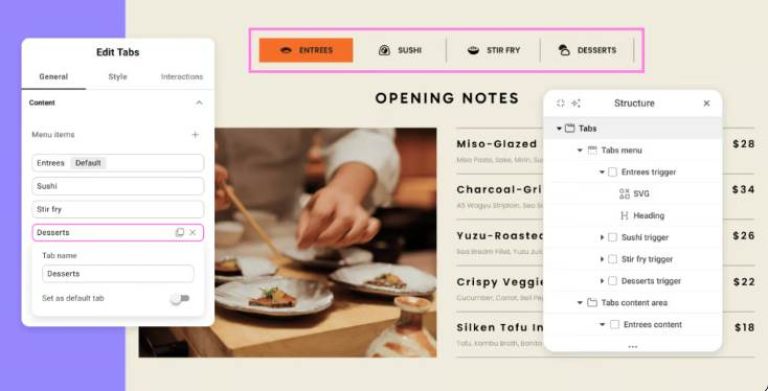
This is the big one. Atomic Tabs are a major building block in the atomic editor because they’re not a single “all-in-one” tabs widget anymore. Instead, Elementor breaks tabs into separate Atomic Elements so I can style and structure each piece the way I want.
Why that matters in practice
With the old approach, tabs were often “here’s the widget, take it or leave it.” Now, the tab system is composable — meaning I can build tabs that match my design system instead of fighting the widget’s default structure.
Atomic Tabs are built around a clear structure (and this is what makes them powerful):
- Tabs (main wrapper)
- Tabs menu (wrapper row that holds triggers)
- Tab trigger (each clickable tab)
- Tabs content area (wrapper for panels)
- Tab content (each panel’s content)
The freedom I’ve wanted for years
Because triggers and panels are basically “containers,” I can place any content inside them. That means tab triggers don’t have to be plain text anymore — I can do:
- Icon + text + badge (“New”, “Popular”)
- Pricing tier tabs with mini layouts
- Product feature tabs with custom grid/columns
- Service tabs with images + CTA buttons
- FAQ tabs that feel like a designed component (not a default widget)
And the best part: it follows the atomic styling system, so I can assign classes everywhere, let styles cascade properly, and understand the hierarchy from the structure panel instead of guessing.
“Selected” state for tab triggers (no hacks)
Elementor added a dedicated Selected state for tab triggers, so styling the active tab is clean and consistent — without custom CSS gymnastics.
Entrance Interactions: lightweight motion that doesn’t bloat the page
The second part I love is the first stage of Atomic Interactions, starting with Entrance Interactions.
Elementor added a dedicated Interactions tab next to the usual General/Style controls, which fits the atomic mindset perfectly: structure, style, then behavior — separated and easier to manage.
What I can control (granular + performance-minded)
Entrance Interactions are intentionally simple and useful — no heavy timeline editor, no complicated presets.
- Triggers: on page load, on scroll into view
- Effects: fade, slide, scale
- Type: in / out
- Direction: up, down, left, right
- Duration: 0.1s–3s
- Delay: 0–2s
- Stacking: combine multiple effects on the same element
- Preview button: replay instantly while tuning
Why I’m pumped about this
This is the kind of motion I actually use on client sites:
- Hero headline: slight fade + up slide
- Feature cards: scroll-in motion that feels modern
- Buttons/CTAs: subtle scale-in for attention
- Testimonials: soft fade-in to reduce “static” feeling
It’s clean, controllable, and clearly meant to grow into a bigger interactions system over time.
How I enabled it (the exact steps)
To turn these V4 editor capabilities on:
Elementor also notes that during Q1 2026, they plan to roll out a production-ready beta, followed by a full release after that.
My practical tip: if you’re activating V4/alpha features, do it first on a staging site or controlled environment (especially for client projects).
What this means for how I build sites going forward
This update is a big signal: Elementor is moving hard toward a workflow where:
- components are atomic + reusable
- styling is class-driven and consistent
- layouts are more modular
- motion is lighter, more intentional, and easier to maintain
Atomic Tabs alone make it feel like I can finally build tab systems that look like premium UI components — not “WordPress tabs.” And Entrance Interactions give me that extra polish without loading a bunch of extra complexity.
If you want, tell me what kind of site you’re building (services, e-shop, directory, landing pages, etc.) and I’ll suggest 5–10 killer ways to use Atomic Tabs + Entrance Interactions to boost conversions and make the UI feel more “high-end.”
![ChatGPT Hecho Simple [ChatGPT Made Simple]: Cómo Cualquiera Puede Usar La Inteligencia Artificial Para Mantenerse Competitivo & Potenciar Su Productividad Laboral, Académica … La Ingeniería De Prompts [How Anyone Can Use Artificial Intelligence to Stay Competitive & Boost Their Workplace, Academic Productivity… Prompts Engineering]](https://i3.wp.com/m.media-amazon.com/images/I/71ULDECMUKL._SL1500_.jpg?w=300&resize=300,300&ssl=1 "ChatGPT Hecho Simple [ChatGPT Made Simple]: Cómo Cualquiera Puede Usar La Inteligencia Artificial Para Mantenerse Competitivo & Potenciar Su Productividad Laboral, Académica … La Ingeniería De Prompts [How Anyone Can Use Artificial Intelligence to Stay Competitive & Boost Their Workplace, Academic Productivity… Prompts Engineering]")